The Moo Helper
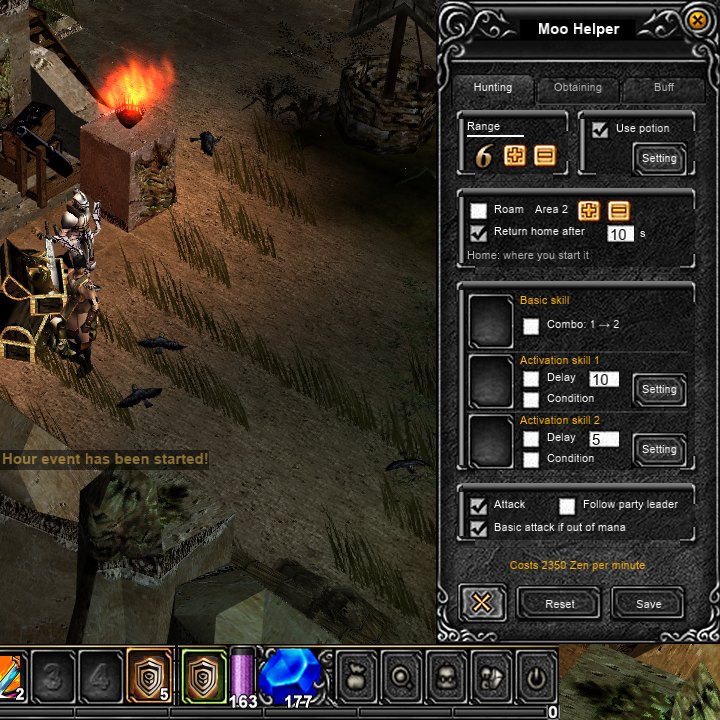
The Moo Helper plays for a character that is away from the keyboard. It fights around the spot where it was started, picks up items, drinks potions and casts buffs. A Fairy Elf also heals. The original game had no helper in Seasons 0 to 2, so the Moo Helper is a Moo Classic addition, available to every player. It charges Zen by the minute while it runs.
Quick facts
| Setting | Value |
|---|---|
| Needs | Level 20, alive |
| Start or stop | Z |
| Open the window | Shift + Z |
| Price | Shown in the window as "Costs N Zen per minute" |
| Base price, first hour | 20 Zen a level a minute (level 100: 2,000 Zen a minute) |
| Price rises | Every hour it runs without a stop |
| Hunting range | 1 to 6 (default 6) |
| Pick-up range | 1 to 8 (default 8) |
| Roam size | 1 to 5 (default 2) |
Starting and Stopping
- Press Z, or the small play icon beside the position box in the top left corner, to start it. Press Shift + Z, or the small setup icon next to it, to open the window.
- It starts where you stand. That spot becomes its home.
- Press Z again to stop it. The chat shows "MU Helper stopped." and, if any Zen was spent, the total.
- The character must be level 20 and alive.
- The chat calls it the MU Helper.
Price
The cost line in the window shows the current price for your level and the settings that are switched on.
- With the base settings, the first hour costs 20 Zen per level per minute. A level 100 character pays 2,000 Zen a minute.
- The price rises one stage for each hour the helper runs without a stop. The stages are 20, 25, 30, 40 and 50 Zen per level per minute.
- The base settings are the potion, the basic attack and the default pick-up kinds (jewels, set items, excellent items and Zen). An Elf also gets the self-heal ("Heal yourself at N %").
- Roam is off by default, so the default price is 100 % of base. Turning Roam on adds 200 % of base for each size step. With the default size 2 the price is 400 % of base.
| Roam size | Price with Roam on |
|---|---|
| 1 | 200 % of base |
| 2 (default) | 400 % of base |
| 3 | 600 % of base |
| 4 | 800 % of base |
| 5 | 1,000 % of base |
- Each of these options adds 25 % to the price: Pick all near items, extra items by name, Repair, Heal party, Buff party, an activation skill, Combo, and Resummon.
- Zen is charged at the end of each full minute. When the helper stops, the part of the minute already begun is charged too.
- If there is not enough Zen for a minute, the game says "MU Helper requires N zen." and the helper stops.
The window
The window has three tabs: Hunting, Obtaining and Buff. Settings save by themselves about a second after each change, and again when the window closes, and are restored at the next login. The Save button stores them and closes the window. Reset puts every setting back to its default and keeps the item name list.
Hunting tab
| Setting | Default | What it does |
|---|---|---|
| Range | 6 | How far from home it hunts. |
| Use potion | On, at 40 % | Drinks a healing potion when life falls below the set percentage. The Setting button changes that percentage. |
| Roam | Off | A hunting mode with its own area. See below. |
| Return home after | On, 10 s | When it has been away from home for that long, it walks back. |
| Set here | Makes the spot where you stand the new home. | |
| Attack | On | The basic attack when the skill is not ready. |
| Basic attack if out of mana | On | Swings the basic attack when a skill needs mana it lacks. Off, it waits instead. |
| Follow party leader | Off | See below. |
| Basic skill | The skill for every swing and cast. | |
| Activation skills 1 and 2 | Off | Extra skills the helper casts besides the basic skill, used on a delay (every N seconds, 10 and 5 by default) or on a condition. |
The condition can be "a monster is in hunting range" or "a monster attacks me", with a number of monsters near you. A Dark Knight has a Combo option for its basic skill (skill one, then skill two). Resummon, on the Buff tab, summons the pet again when it has died. A Dark Lord has one activation skill.
When a monster hits the character, the helper fights back, even if the monster is outside the hunting circle. It finishes weak monsters before it moves on to others.
Obtaining tab
| Setting | Default | What it does |
|---|---|---|
| Repair | Off | Mends a worn item at half durability (the yellow mark), one item per request, at most once a minute for each slot. It pays the repair price. |
| Pick all near items | Off | Picks up every drop in the pick range. |
| Pick selected items | On | Picks up only the kinds ticked below. |
| Jewel/Gem, Set item, Zen, Excellent | On (zen, jewel, set, excellent) | The kinds it picks. |
| Minimum item level (the "Least +" box) | Picks up gear at that item level or higher. Only the number in the box is used. | |
| Skill, Luck | Off | With the minimum item level, only gear with Skill or Luck. |
| Only for named items | Off | The filters above apply to the named list alone. |
| Add extra item | Off | Picks up items by name. Type the name, then Add or press Enter. Delete removes one. |
While under attack, the helper keeps fighting instead of walking off for loot, and only picks up items lying close by. It leaves alone items the character dropped itself, and gives up on an item it cannot pick up.
Buff tab
| Setting | What it does |
|---|---|
| Buffs on you | Three slots for the buffs you cast on yourself. Until you change them, they hold your own buffs from the list. |
| Recast before they run out (default) or Recast every N s | When a buff is cast again. |
| Heal yourself at N % | On, at 60 %. Elf only. Heals you at that life level. |
| Summon, Buff summon, Resummon | Shown when you know a summon skill. |
| Party buffs | Three slots for the buffs cast on the other members. |
| Buff party, every N s | Off by default; the timer is 30 s. Casts the party buffs on members, on that timer. |
| AE or EE | Elf only, the two Elf modes. AE (attack and buff) hunts and casts the party slots between fights. EE (support) buffs and heals and never attacks. |
| Heal party at N % | Off by default, at 60 %. Elf only. Heals the lowest member at or under that life level. |
Roam
Roam moves the hunting circle with the character, so it hunts wherever it walks.
- The area is 10 steps per size, counted from where Roam began. The size is 1 to 5, set with the + and − buttons beside "Area".
- When the circle is empty, the character walks to a monster in sight. It never leaves the area and never returns home.
- Each size costs more. The cost line in the window shows the price.
Return home and Set here
- With Return home on, the helper walks back home once it has been away for the time you set. If you click the ground, the helper pauses. Home does not change, and the helper walks back afterwards.
- Set here makes the tile you stand on the new home.
- Roam, Return home and Follow party leader cannot be used together. Turning one on turns the others off.
Follow party leader
- It needs a party and a leader who is not you.
- The hunting circle moves to the leader. The helper walks after the leader and stops beside them.
- It pauses when the leader teleports, warps or dies, or when the party ends. It resumes when the leader is back in the circle.
Classes
- Fairy Elf: heals herself first, at the Heal yourself level, then the party at the Heal party level. She buffs herself from her own buff slots and the party from the party slots. AE (attack and buff) hunts and buffs. EE (support) buffs and heals and never attacks.
- Dark Knight: the Combo option on the basic skill.
- Dark Lord: one activation skill.
- Before you save any settings, each class fills its three buff slots with the buffs it knows.
When it stops
| Cause | What happens |
|---|---|
| Z pressed | It stops. |
| The character dies | It switches off. A dead character cannot start it. |
| Warp to another map | It stops. |
| Out of Zen for a minute | "MU Helper requires N zen." It stops. |
| Leaving the game | It stops on the server too. |
While it runs, walking into a map gate does nothing and the chat says "Turn off the MU Helper first." The helper keeps running.
These pause it without stopping it:
- A safe zone, such as a town. It continues when you leave the zone.
- An open personal store, trade, shop, vault or mix window.
- A click or Space from you. You control the character for a moment, then the helper continues.
A teleport of up to 12 tiles on the same map does not interrupt it.