 Moo Classic Wiki
Apps and updates
Quick facts
| Version | Notes |
|---|---|
| Mac | Moo Classic.app, signed, with the game files inside. It updates itself. |
| Windows | A zip with the game files beside the program. It can update itself. |
| Linux | A tarball for 64-bit Intel and AMD, with the game files beside the program. |
| Android | An APK: a 64-bit one for current phones and a 32-bit one for old phones. A small starter pack is inside and the rest downloads while you play. |
| iPhone and iPad | Play in Safari now, or ask for the iPhone app (a TestFlight test build): press iPhone app in #beta-access on our Discord. |
| Browser | The same game in Chrome, Edge or Safari, on phones and tablets too. Nothing to install. |
The closed beta is on now, for members of our Discord: pre-register, then press Get beta access in #beta-access. Then the downloads open for you at mooclassic.com/downloads once you sign in. See Pre-registration and invites.
Starting the game
The first thing you see is the Moo Classic logo on black, with a bar under it. It fades once the first screen has drawn.
After that every version shows the same loading screen.
| Part | What it shows |
|---|---|
| Top | The logo |
| Middle | A Wizard, Knight, Elf or Gladiator on Lorencia's ground, swinging or casting every few seconds |
| Tip | A line of advice |
| Strip | "Checking for updates", "Up to date" or "Starting Moo Classic", with the build number |
On a computer it stays at least 5 seconds. Enter, Space or Esc ends it early.
Updates
Updates are forced when they have to be. If the server and the game change together, the server raises the version it asks for. An older copy is turned away at the server list and told to update.
| Where you play | How it updates |
|---|---|
| Computers | The login shows an update panel. A bar moves as the file downloads, with the megabytes done, the speed and the time left. The game then restarts itself. If the download fails, you can retry, or play anyway while the server still takes your version. |
| Mac | The update is built next to the app you installed, swapped in, and the game files carried over. The app restarts as itself, in the same place. |
| Android | The app installs its own updates and keeps downloading changed game files while you play. |
| Windows zip and phones | A newer build is offered in a window before login (Open TestFlight, Download, Later). While you play, 1 yellow chat line appears at most every 30 minutes. |
Restart warnings: before a server update the game tells you, 5 minutes and then 1 minute ahead. While the server is down for it, the login screen says "Moo Classic is updating" with the time left, instead of "Can't reach the server".
News
A news icon with a red count of unread items sits at the top left of the login screen, beside Create account (see the picture above). Inside the game, the Esc menu has a News row that opens the same window.
| Where | What you see |
|---|---|
| Login screen | The news icon with a red count, top left |
| In the game | The News row in the Esc menu, the same window |
| Read state | Saved for your account: news read on one device counts as read on all |
Report a problem
Three ways to open it:
| Way | How |
|---|---|
| Key | F12 |
| Command | /bug |
| Menu | Report a problem in the Esc menu |
The game takes a screenshot first, then sends your text with the end of the game log. A crash reports itself.
Once per play session the game also sends a short anonymous line about your device (system, model, graphics card and frame rate). Send anonymous usage stats in Options switches this, and the crash reports, off. The report window stays open until you close it, and you can move it.
Browser
The browser version loads each map's files the first time you visit it and keeps them for next time. It keeps playing when the tab is in the background. It holds the frame rate to the cap you set in Options.
When something goes wrong, a plain screen offers Reload, and Details shows the technical text with a Copy button. A banner says when a new version is ready. The browser's own paste works in the game's text boxes.
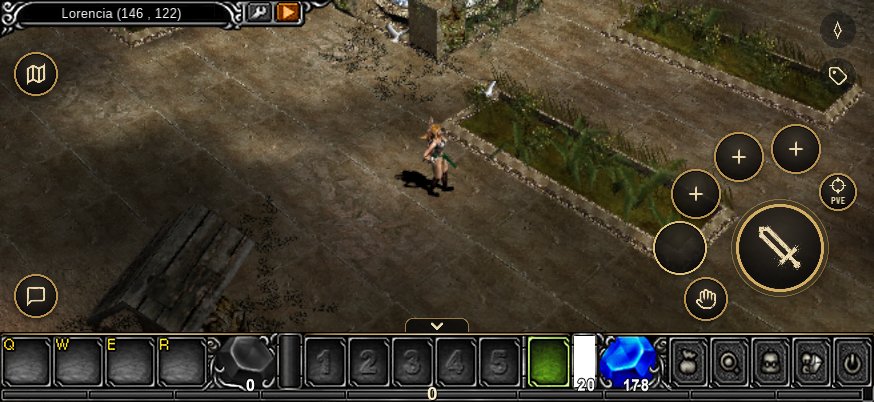
On phones it uses the same touch layout as the app: see Playing on any device.
Compared with the original
| Change | What now happens |
|---|---|
| 1 loading screen | Every version shows the same one. |
| Update panel with a bar | The login waits for the update and shows progress. |
| Old versions refused | The server list turns them away. |
| Starter pack on Android | A small download first, the rest while you play. |
| Report a problem | F12, /bug or the Esc menu. |
| 1 news window | Same window at login and in the Esc menu, read state saved per account. |