 Moo Classic Wiki
Guilds
Guilds are available from Season 0. Castle Siege opens with the Valley of Loren on the road to Season 2.
Overview
| Topic | Fact |
|---|---|
| Creating NPC | Guild Master, Devias 215,45 |
| Level needed | 100 |
| Cost | None |
| Name length | 4 to 8 characters, no symbols |
| Emblem | 8x8 pixels, 16 colours |
| Guild window | G |
| Guild chat | Start a line with @ |
| Alliance chat | Start a line with @@ |
| Alliance size | Up to 5 guilds |
| Commands | Command Window, Social tab |
The Guild Master
The Guild Master stands in Devias at 215,45. He is the only one of his kind, and he only creates a guild.
If you are below level 100, or already in a guild, he tells you so and nothing opens. Joining, ranks, kicking, war and alliances run through chat commands and the guild window.
| He does | He does not |
|---|---|
| Creates your guild | Sell items or give quests |
| Tells you why you cannot | Charge zen |
Creating a guild
| Requirement | Value |
|---|---|
| Level | 100 or higher |
| Current guild | None |
| Zen | Free |
- Go to Devias and talk to the Guild Master. Choose to create a guild.
- Type a name of 4 to 8 characters, with no symbols. A name already taken is refused.
- Paint the emblem on the 8x8 grid. Left click paints the chosen colour and right click clears a cell. Pick from 16 colours. An empty emblem is refused.
- Check the preview and confirm.
The emblem shows on your character and in the guild window. Press G to open the window. Level 100 is the usual rule of the original game, and Moo Classic keeps it.
Joining a guild
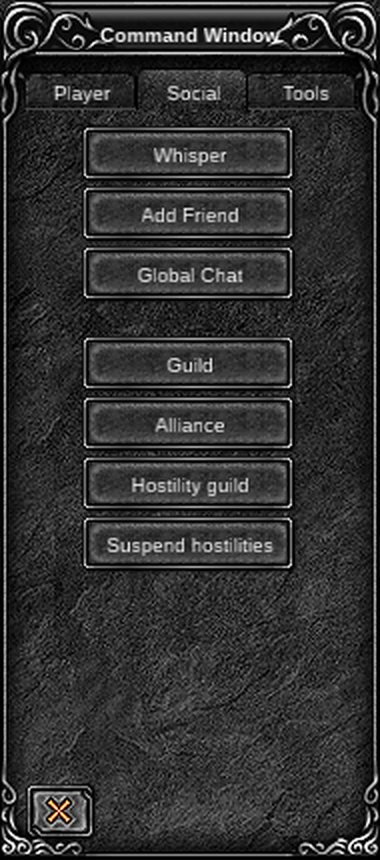
Point at the Guild Master of the guild you want to join and type /guild. Or use the Guild button in the Command Window and right-click him. He sees a box with your name and accepts or refuses.
Guild window
Press G. Without a guild, the window explains how to create or join one. With a guild, it has three tabs.
| Tab | Shows |
|---|---|
| Guild | Emblem, score, hostile guild, announcement, and a Disband (master) or Leave button |
| Members | Name, rank and the server each member is on, with buttons to change a rank or remove a member |
| Alliance | The guilds in your alliance, or help text if you have none |
Leaving, removing a member and disbanding ask for a security code first.
Ranks
| Rank | Who |
|---|---|
| Guild Master | Founder. The only one who can set ranks, remove members, start wars and ask for alliances or hostility |
| Assistant Guild Master | Appointed by the master |
| Battle Master | Appointed by the master |
| Member | Everyone else |
Only the Guild Master can change ranks. He picks a member in the Members tab and chooses Position to appoint, Dissolve to return a member to normal, or Release to remove one. The Members tab always shows the result.
Guild chat
| Start the line with | Who sees it |
|---|---|
@ |
Your guild |
@@ |
Your alliance |
Guild lines also have a Guild channel in the chat window (press Y), so you can read them without the small log.
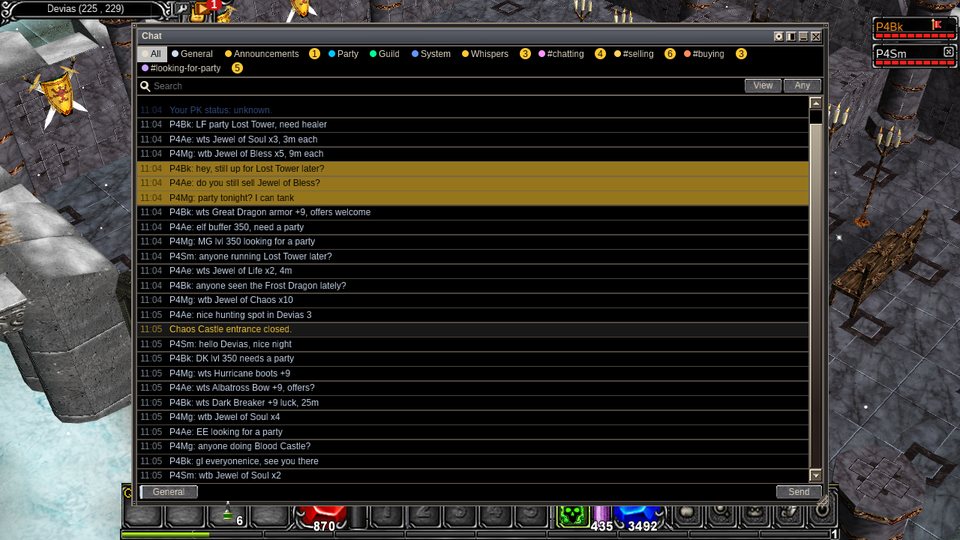
The original game had one small log for everything. Moo Classic added channels, unread counts and search. The other chat lines are in Command Window and Party and PK.
Alliances
An alliance joins several guilds. Its members share one chat line (@@) and show the alliance name above their names.
| Step | What to do |
|---|---|
| Ask | The Guild Master points at another guild master and types /alliance or /union. The other master accepts or refuses. |
| Size | Up to 5 guilds. The original game's client text names 7, so Moo Classic's limit is lower. |
| Leave | The master of a member guild leaves with the Disband guild alliance button. |
| Remove | The alliance master removes a guild with Disband alliance. |
The plate over a head
A guild member's name stands in one block with the guilds' lines above it, all as wide as the widest line and left-aligned:
| Line | Reads | Shown |
|---|---|---|
| Top | The alliance name and the standing in it | Only when the guild is in an alliance |
| Middle | [Guild name] and the rank: Master, Assistant, Battle Master or Members |
For every guild member |
| Bottom | The player's name | Always |
The block shows whenever names show, so the guild and the name always come together. The colour tells you who it is:
| Colour | Who |
|---|---|
| Lime green | You, your guild and the guilds in your alliance |
| Pale blue | Any other guild |
| Red | A guild your guild is hostile to |
A player in no guild has the name alone. The original game draws the plate the same way.
Hostility
Hostility marks two guilds as enemies. Only one hostility can run at a time per guild.
| Action | How |
|---|---|
| Start | The Guild Master points at the other guild master and types /hostilities or /rival. The other master must agree. |
| End | /rivaloff or /suspend hostilities |
| Effect | Members of hostile guilds can kill each other without gaining a PK step. See Party and PK. |
| See it | The hostile guild shows in the Guild tab. |
Guild war
A guild war is a fight between two guilds that both agree to it.
- The Guild Master types
/war <guild name>. - The other guild's master must be online. He sees a box and accepts or refuses. A refused request gives the sender a message and nothing happens.
- When it starts, a notice appears and a score box shows both guild names and emblems.
- When it ends, a notice says whether your guild won or lost. If a master leaves the game mid-war, the other side wins.
| Scoring in the original game | Points |
|---|---|
| Killing a member of the other guild | 1 |
| Killing the other guild's master | 2 |
| The war is won at | 20 |
A win raises the winner's guild score, by more for a 20 to 0 win. A guild already at war cannot be challenged.
Moo Classic a plain war takes in every member of both guilds, and the kills of every member score, as in the original game. Battle Soccer scores its goals.
Battle Soccer
Battle Soccer is a guild war played with a ball in the Arena.
- The Guild Master types
/battlesoccer <guild name>, or presses the Battle Soccer button on the Command Window's Social tab. The Arena Guard also explains how to start a match. - The other master accepts or refuses, as with a war.
- Both teams are sent to the field. Hit the Soccer Ball to push it toward the other goal. The ball bounces off the walls and corners.
- A goal scores 20 for your team. The first team to 100, five goals, wins. Kills do not score.
- At the end everyone returns to the safe zone at the stadium's north end. A match also ends when a team leaves the Arena, or when a guild master leaves the game.
/battlesoccer Wolves. Wolves' master clicks OK, both teams appear on the field, and the first side to put the ball in the goal scores.Castle Siege
Castle Siege is the large guild event that opens on the road to Season 2, fought in Valley of Loren. It is built but switched off.
| Rule | Value |
|---|---|
| Guild members to register | 20 |
| Guilds that can attack at once | 3 |
| Crown hold time | 30 seconds |
| Battle | Saturday, 20:00 to 22:00 UTC |
| Needed to register | Signs of Lord (not in the game until the siege opens) |
Hold the Crown for 30 seconds and your guild owns the castle. Moo Classic the owner can add up to 3 percent to chaos mixes, see Chaos Machine. The schedule, prices and objects are in Castle Siege.
The original game ran the siege every few weeks. Moo Classic plans a weekly cycle.
Related
| Page | What it adds |
|---|---|
| Guild Master | Makes guilds, in Devias |
| Castle Siege | The guild war for the castle: signing up, the battle, owning the castle |
| Valley of Loren | The castle's map, with the Guardsman, Senior, Guard, Pamela the Supplier and Angela the Supplier |
| Land of Trials | The castle owners' own hunting map |
| Arena | Battle Soccer's field |
| Party and PK | Every guild command and the PK rules hostility skips |
Compared with the original
| Change | What |
|---|---|
| Command Window Social tab | Guild, Alliance, Hostility guild, Suspend hostilities and Battle Soccer buttons, next to Whisper, Add Friend and Global Chat |
| Chat window | Press Y for channels, including Guild, with unread counts and search |
| Alliance size | Up to 5 guilds |
| Siege schedule | Weekly, Saturday 20:00 UTC |
| Phones | Tap a player and choose Guild |
Tips
- Gather 20 members before you plan for Castle Siege.
- Check the Members tab after changing a rank to see the result.
- Point carefully. Alliance, hostility and join commands act on the guild master you point at.
- Related guides: Party and PK, Castle Siege, Command Window, Chaos Machine, Crywolf, Getting started.