 Moo Classic Wiki
Chat and messages
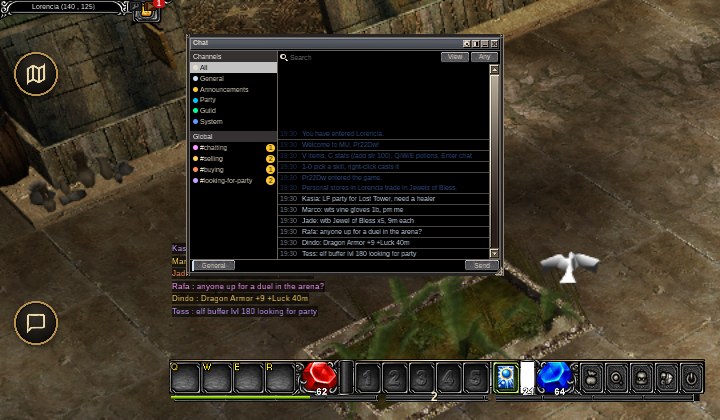
/post talks to every player online, in channels for selling, buying and finding a party.Moo Classic keeps the original chat line and adds the window on top.
Quick facts
| What | How |
|---|---|
| Open the chat window | Y, /chat, or Global Chat in the Command Window. On a phone, the Chat key on the bar. |
| Talk to everyone online | /post <text>, one post every 10 seconds. Level 10 needed. |
| Pick a channel | /post #selling vine gloves. No tag goes to #chatting. |
| Whisper | Click a name in chat and pick Whisper. Each person gets their own thread. |
| Move and resize | Drag the title bar, and the grip in the corner. |
The chat window
Press Y. One window opens, in the look of the friend window. You can move it, resize it, and make it see-through (100, 75, 50 or 25 percent) so you can watch the fight behind it.
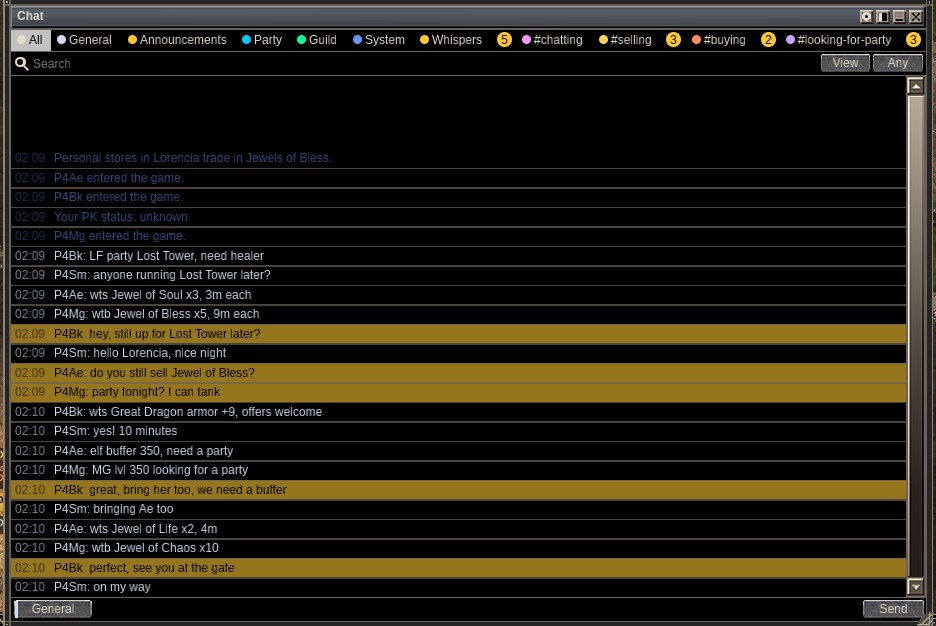
What the sidebar lists
The left side lists where lines come from.
| Group | What is in it |
|---|---|
| Channels | All, General, Announcements, Party, Guild and System |
| Global | #chatting, #selling, #buying and #looking-for-party |
| Whispers | One thread per person, with online friends first |
| Friends | Your friend list |
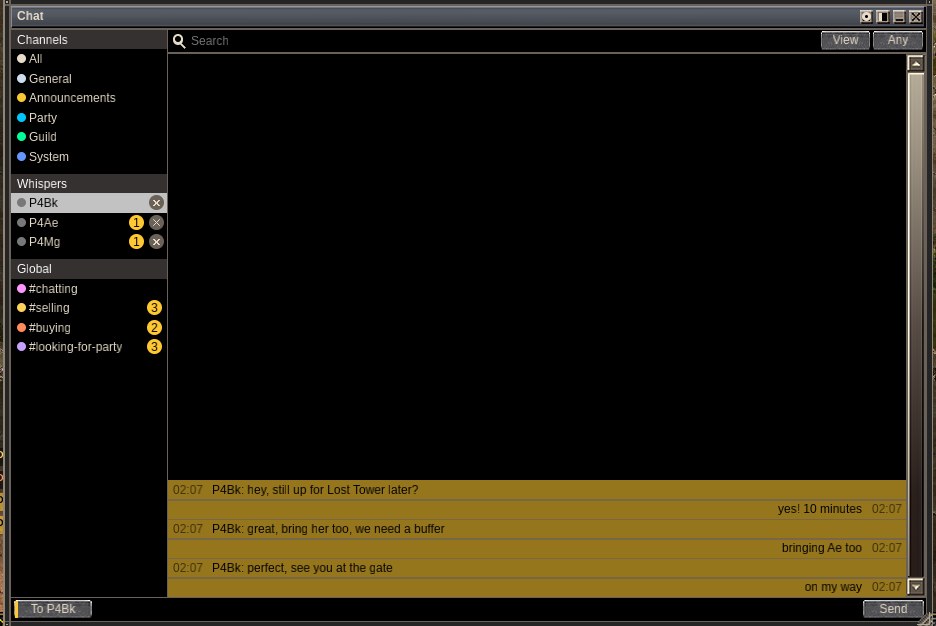
A badge counts the lines you have not read in each one. A "N new" button jumps to the newest line. The search strip looks back 10 minutes, 1 hour or as far as the window remembers. The gear picks which channels also show in the small log at the bottom left of the screen.
Global chat
The full article, with pictures, is Global Chat.
/post speaks to every player online, so you can sell, buy or look for a party without standing in town. A tag in front sends the post to that channel's tab, in its own colour.
| Tag | Short forms |
|---|---|
#chatting |
None. A post with no tag goes here. |
#selling |
#sell |
#buying |
#buy |
#looking-for-party |
#lfp |
Tags also work inside a macro, for example /1 /post #selling vine gloves.
/post #selling vine gloves, then try again after 4 seconds. The game says "You can post again in N s" and keeps your text. One post every 10 seconds, for every client alike.You can search the last 24 hours of the tagged channels, up to 1,000 lines. That is the quick way to see who sold something lately.
The System view
The System view collects what happens to you between fights.
| Line | When |
|---|---|
Obtained N Exp |
Once per kill |
N Zen Obtained |
Every pile of zen you pick up, by hand or by the Moo Helper |
| Your pickups | With their level and luck |
X killed you, You killed X |
And your PK status |
You can hit back <name>: N s |
A red line while the 60 seconds of self-defence last |
When a party member picks up an item, the rest of the party sees a blue line:
[Party] Name picked up Excellent Kris +7 +LuckLetters and friends
The friend window (F) holds your friends, your letters and chat rooms, as in the original game. A chat room with a friend opens in its own window, and you can have many open at once.
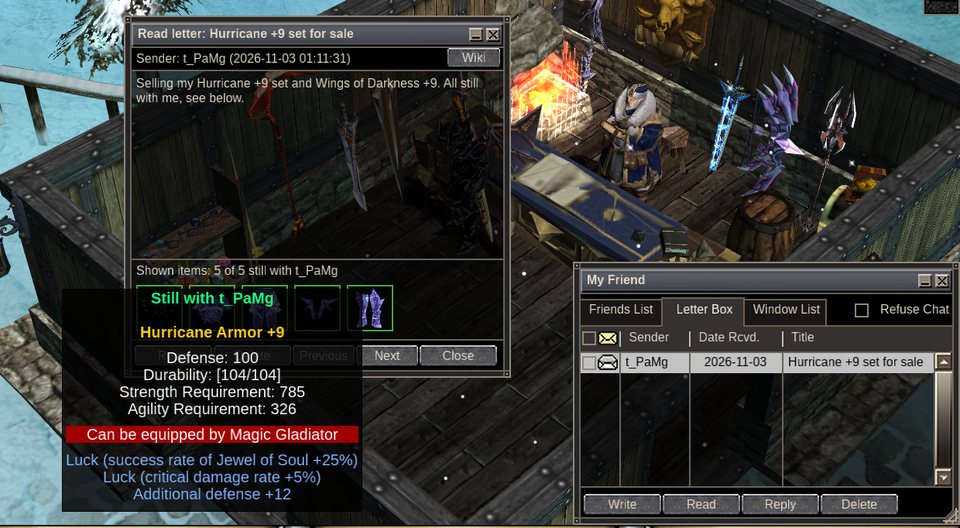
Letters are on the wiki too, under Messages: one letter box for the game and the web. The Wiki button on a letter in the game opens it there. The Messages page has Inbox and Sent tabs, a search, letters grouped by day and a quick reply under each letter.
| You want | How |
|---|---|
| Write a letter | F, then Write. In the game a letter costs 1,000 zen. On the wiki it is free, up to 20 an hour and 60 a day. A letter written on the wiki reaches the player in the game at once. |
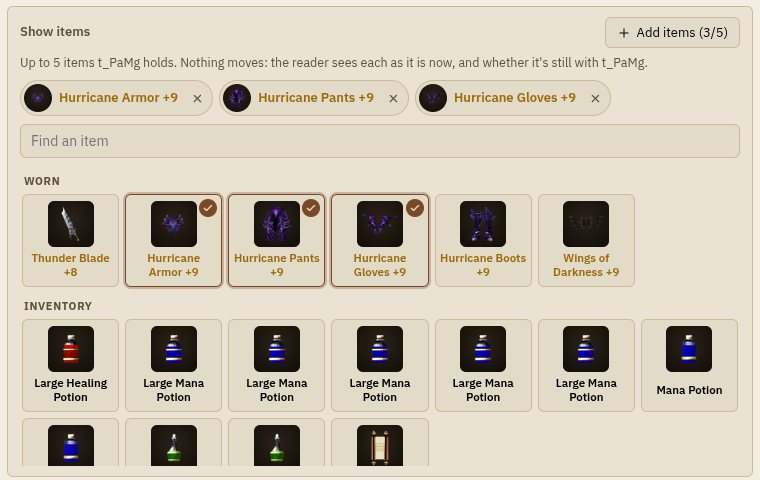
| Show items in a letter | Click a slot under the text, then an item in your bag, gear or personal store. Up to 5. On the wiki, Add items under the text, your vault too. |
| Read a letter on the web | Wiki on the letter's sender line, or open Messages. |
| Block or report a writer | Block, beside the letter on the wiki, stops their letters reaching you, in the game and on the wiki. Report sits there too. A letter you wrote can be reported from Sent. Agree your deals in letters: if one goes wrong, report the letter and staff look into it. |
Showing items lets a buyer check that what you sell is real before trading. A shown item never leaves you. The reader sees it as it is when they read the letter, under "Still with" and your name. Once it has left you, it reads "No longer with" and shows nothing else.
Records are kept so staff can look into reports, scams and fraud: trades for a year, letters for 180 days (also after you delete them) and chat for 90 days. Only staff read them, and only for a report or a case. See the privacy policy.
| You want | Go to |
|---|---|
| Party and PK lines | Party, PK and commands |
| Every chat command | Commands and keys |
Phones
A phone has a Chat key on the bar and the same chat window. The window and its text stay inside the safe area of the screen, away from the notch. See Playing on any device.
Compared with the original
| Change | What now happens |
|---|---|
| One chat window | Channels, whispers, friends, search and unread badges in one window, opened with Y. |
/post tags and tabs |
#selling, #buying and the others get their own tab and colour. |
| Readable channel colours | Posts in the # channels are written in their colour on the normal dark backing. |
| 10 second wait | The server holds every client to one post per 10 seconds. |
N Zen Obtained |
Printed for every pile, beside the experience lines. |
| Party pickups | A party sees what a member picked up. |
| Letters on the wiki | The game's letters are read and written on Messages too, with a Wiki button on each letter in the game. |
| Items shown in letters | A letter can show up to 5 items its writer holds, each with "Still with" or "No longer with". |