 Moo Classic Wiki
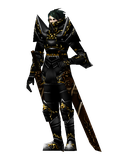
Guild Master
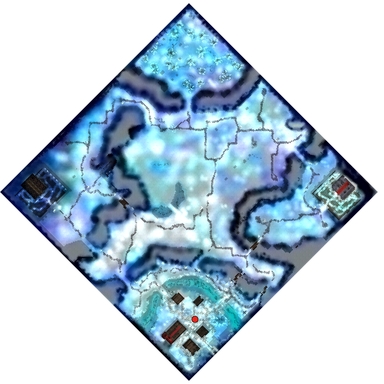
The Guild Master founds guilds in Devias at 215, 45. You need level 100 and no guild, and creating a guild is free.
You pick a name and draw an emblem, and the guild exists as soon as you press the last button.
| Guild Master | |
|---|---|
 | |
| Role | Guild creation |
| Season | Season 0 |
| Found in | Devias (215, 45) |
| Shop | No |
Creating a guild
Click him. Below level 100 or already in a guild, he answers in a speech bubble. Otherwise a Guild window opens with a Create guild button.
- Press Create guild.
- Type the guild name, 4 to 8 letters or digits. Symbols and shorter names are refused, and so is a name already taken.
- Draw the emblem on the 8 by 8 grid with 16 colours. Pick a colour, then paint with the left mouse button. The right button clears a cell. Paint at least one cell.
- Press Next to see the result, then Next again to create the guild.
You become the guild master with the rank Master. Your emblem shows on the body of every member, and a line with the guild name and rank shows over a member's name when you point at them.
What you can do here
| What | How | Guide |
|---|---|---|
| Make a guild | Level 100 and no guild. It costs no zen | Making a guild |
| Draw its mark | An 8 by 8 emblem in 16 colours, shown on every member | Making a guild |
| Invite members | A player of level 6 or more types /guild next to the master |
Joining a guild |
| Name an assistant and battle masters | The master hands out the ranks | Ranks |
| Join an alliance | /alliance in front of another guild master, up to 5 guilds |
Alliances |
| Declare a rival | /hostilities: rival guilds kill each other without PK |
Hostility |
| Challenge to a guild war | /war <guild name> |
Guild war |
| Challenge to Battle Soccer | /battlesoccer <guild name>, played in the Arena |
Battle Soccer |
| Fight for the castle | Castle Siege is switched off, so there is no siege yet. When it runs: 20 members and Signs of Lord, at the Guardsman in Valley of Loren | Castle Siege |
| Leave or disband | Leave, Release or Disband in the G window | Guild window |
Running the guild
The Guild Master only starts the guild. After that you run it through your own character.
- The G window has three tabs: Guild, Members and Alliance. The Guild tab shows the emblem, the guild score, the member count and the guild you are hostile to. The Members tab lists every member with their rank.
- Guild size grows with your level, up to 80. A Dark Lord's Command adds to the limit. See Stats and builds.
- Joining. A player of level 6 or more with no guild stands next to a guild master and types
/guild. The master gets a box with the player's name and presses OK. The Command Window's Social tab has a Guild button that does the same. - Ranks. Only the master hands them out. A guild has one assistant guild master, and at levels 100 to 199 the master can name one battle master.
- Leaving, kicking and disbanding. A member leaves with the Leave button. The master kicks with Release or disbands with Disband. A box asks for your security code first.
- Chat. Start a line with
@to talk to your guild only, or@@to reach every guild in your alliance. - Guild war and battle soccer. The master types
/war <guild name>or/battlesoccer <guild name>. The other guild's master must be online and press OK. Each side is its master's party, or the master alone with no party. - Alliance and hostility. Stand in front of another guild master and type
/allianceor/unionto propose an alliance, or/hostilitiesor/rivalto declare a rivalry./rivaloffends a rivalry.
Members of hostile guilds can kill each other without PK steps. See Party, PK and commands for the full list of guild commands.
Getting there
He is the only Guild Master, so every guild is founded in Devias.
- Open the Move list (M) and pick Devias. It needs level 20 and costs 2,000 zen. You land at 205, 42, about ten tiles from him.
- Or walk from Lorencia into the gate at 5 to 6, 38 to 41. It needs level 15 and is free. You land at 242 to 243, 34 to 37, about 27 tiles east of him.
Devias is a town, so you are safe there while you draw your emblem.
Tips
- Pick the name and plan the emblem before you go. It shows on every member's body, so choose one that reads well at a small size.
- Have a second name ready, because guild names are unique.
- Bring the first members with you. A character of level 6 or more can join as soon as you have created the guild.
- Have your security code ready before you press Leave or Release.
Compared with the original
- The Command Window, opened with the D key, has a Social tab with Guild, Alliance, Hostility guild and Suspend hostilities buttons, next to Whisper, Add Friend and Global Chat.
- The alliance holds up to 5 guilds. The original game's text says 7.
Where to find
See also
- Castle Siege: Related
- Guilds: Overview
- Guilds: The Guild Master
- Guilds: Creating a guild
- Guilds: Related
 Baz the Vault Keeper
 Caren the Barmaid
 Crossbow Guard
 Guild Master
 Hermit
 Izabel the Wizard
 Lahap
 Marlon
 Messenger of Archangel
 Potion Girl Amy
 Sevina the Priestess
 Zienna the Weapons Merchant