Party Rules
A party plays better when everyone knows how loot and invitations work. The leader sets the rules once, and every member can read them: how zen is split, whether strangers may ask to join, and who leads. Zen is the one thing a party can split. Items always stay with whoever picks them up.
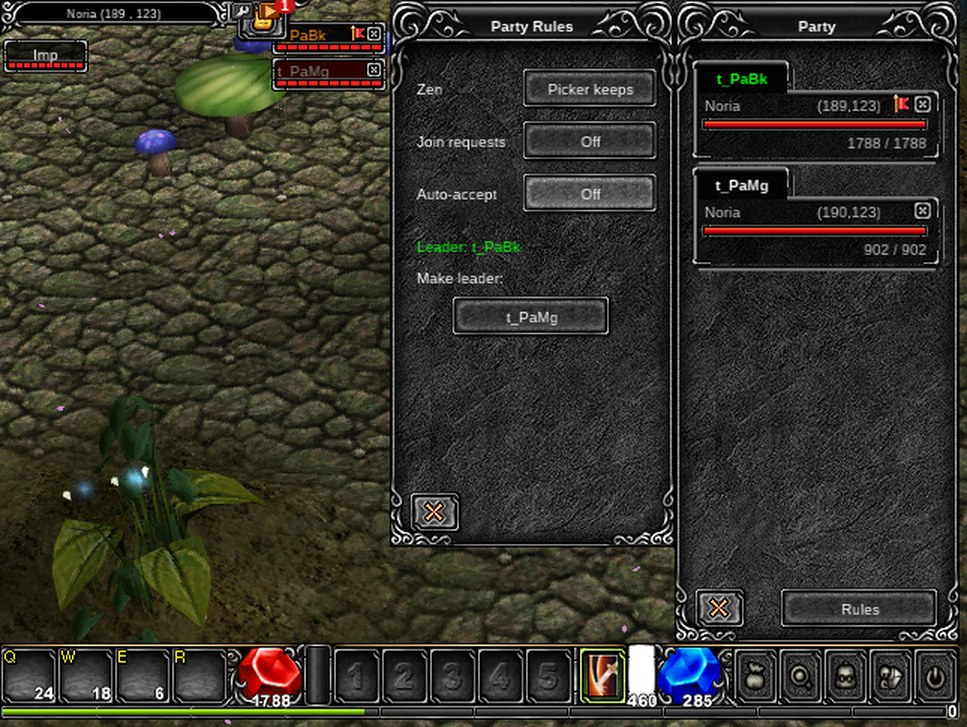
Quick facts
| Thing | Value |
|---|---|
| Open | P for the party window, then its Rules button |
| Who can change the rules | The party leader only |
| Who can read them | Every member |
| Rules | Zen sharing, join requests, auto-accept, who leads |
| Starting rules | Zen to the picker, join requests off |
| Party size | Up to 5 |
| Reset | Each time a new party forms |
The rules
Zen: to the picker, or shared equally
- To the picker (the default): whoever picks up a pile of zen keeps all of it. This is how the original game worked.
- Shared equally: a pile is split evenly between the one who picks it up and every member on the same map, as long as the pile is picked up outside a town. In a safe zone the picker keeps it.
- A Golden Cowbell's pile always stays with its owner, whatever the rule says.
Use equal sharing when you hunt as a group and nobody wants to race for the piles. Keep the default when everyone hunts alone side by side.
Commands: /partyrules zen shared and /partyrules zen picker.
Join requests: on or off
- Off (the default): the only way in is an invitation from the leader.
- On: any player can ask to join with the Request to Join button of the Command Window, or with
/partyjoin <name>on any member. The leader sees "asks to join your party" and a box with the player's name. OK adds them. Cancel refuses them. - A request passes the same checks as an invitation: the party must have room, and your level must be no more than 130 away from the highest and the lowest level in the party.
Use it when you want to fill a party from the people standing around, for a boss or a Devil Square run.
Commands: /partyrules join on and /partyrules join off.
Auto-accept: for the leader who steps away
The leader's Rules window has an Auto-accept row. With it on, a join request lets the player in without asking, so a leader who is away from the keyboard still fills the party. Turning it on also turns join requests on. Turning join requests off turns it off again.
Auto-accept belongs to the leader's own device. It is not a rule the party sees, and it is off again on a new device.
Handing on the lead
The leader can pass the lead to any online member. Click the member's name in the Rules window, or type /partylead <name>. The new leader moves to the top of the list in green, and everyone is told.
Only the leader can invite, change the rules and hand on the lead, so hand it on before the leader logs off.
Who sees what
- Every change shows to the whole party as a blue
[Party]line: "set the rules: ...". - A member who joins, or returns after being offline, hears the current rules.
- When a member picks up an item, the party sees a
[Party]line naming it. Strangers never see it. - Rules reset when the party breaks up and a new one forms: zen to the picker, join requests off.
Rules that never change
These are the same in every party, whatever the leader chooses.
- Experience is shared by the monster's killer and by every member who is alive, on the same map and within 10 tiles of the monster. The more members share, the bigger the bonus: 160% with two, up to 220% with five, and up to 300% for a party with one Dark Wizard, one Dark Knight and one Elf. See Party and PK for the table.
- Items stay with the one who picks them up. A quest item that drops in a party goes to the member who needs it.
- The level gap for joining is 130, for invitations and for requests alike.
- Party chat: start a line with
~and only your party reads it.
Questions
| Question | Answer |
|---|---|
| Can anyone see the rules? | Yes. Every member sees the Rules window. Only the leader's buttons work. |
| Does equal sharing split items? | No. Only zen. |
| Why did I get nothing from a pile? | Equal sharing needs you on the same map and the pile picked up outside a town. |
| Can I join a party without the leader's OK? | Only if the leader turned Auto-accept on. |
| Do the rules follow me to another party? | No. Each party starts with the default rules. |
See also Party and PK for experience sharing and PK, the Command Window for Request to Join, and the Moo Helper for following the leader.